
Creating Custom Channels
Coax builds channels out of your media library on its own — organized by genre, decade, studio, director, actor, collection, and more. Here is how channels get made, and how to shape them to your taste.
How channels are built
When you generate a guide, Coax reads the libraries in your lineup and groups their content into categories. Each category produces a set of channels — the Genre category might give you an Action channel, a Comedy channel, a Horror channel, and so on.
Channels are filled with a shuffled but deliberately ordered mix: Coax avoids putting the same show back to back, and spreads your content across the schedule.
The Channels Manager
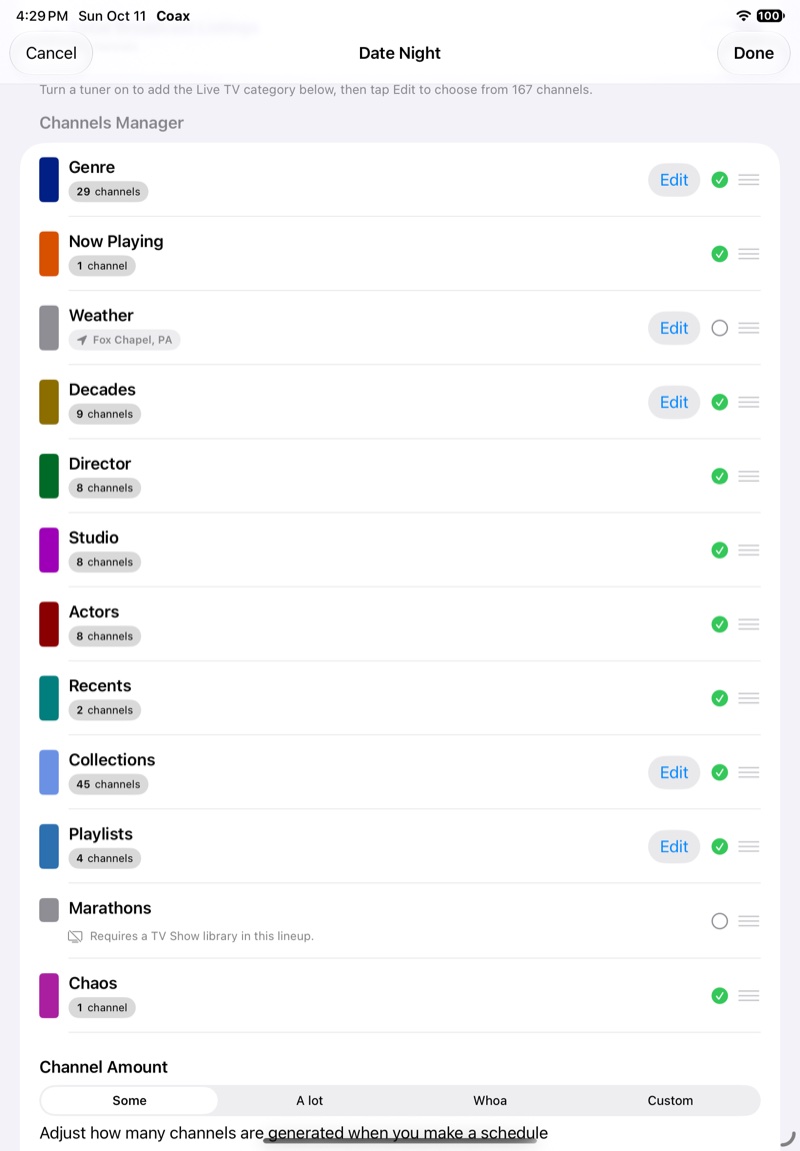
Coax builds channels from what is already on your server. The Channels Manager, in a Lineup's Configure, lists thirteen kinds of channel as rows. Turn each one on or off; its count is how many channels it makes.
| Genre | One channel per genre with enough matching items in your lineup's libraries. |
|---|---|
| Now Playing | Rotating Now Showing cards for what is on your other channels. |
| Weather | A local weather channel. |
| Decades | Channels grouped by era — 80s Movies, 90s TV, and so on. |
| Director | Channels dedicated to individual directors. |
| Studio | Channels dedicated to individual studios and networks. |
| Actors | Channels dedicated to individual actors. |
| Recents | Channels for recently added content. |
| Collections | One channel per collection on your server. See Collections and playlists. |
| Playlists | One channel per playlist on your server. |
| Marathons | Always-on channels for shows you hand-pick, each playing a show's episodes in order from a random point in its run — one channel per show. They follow the lineup's age groups, but not its Watched Status or release dates. |
| Chaos | A wildcard mix of everything in the lineup. |
| Live TV | Channels from a TV tuner registered with Plex, such as ErsatzTV, dizqueTV, or Tunarr. See Coax, ErsatzTV, and Tunarr. |
A few rows have extra requirements. Marathons needs a TV show library in the lineup, Weather needs a location, which Edit on its row sets, and on Jellyfin the Director and Actors rows need the Coax plugin installed on the server. Emby has no Coax plugin, so an Emby lineup gets no Director or Actors channels. Live TV appears once a tuner is on under TV Tuners.
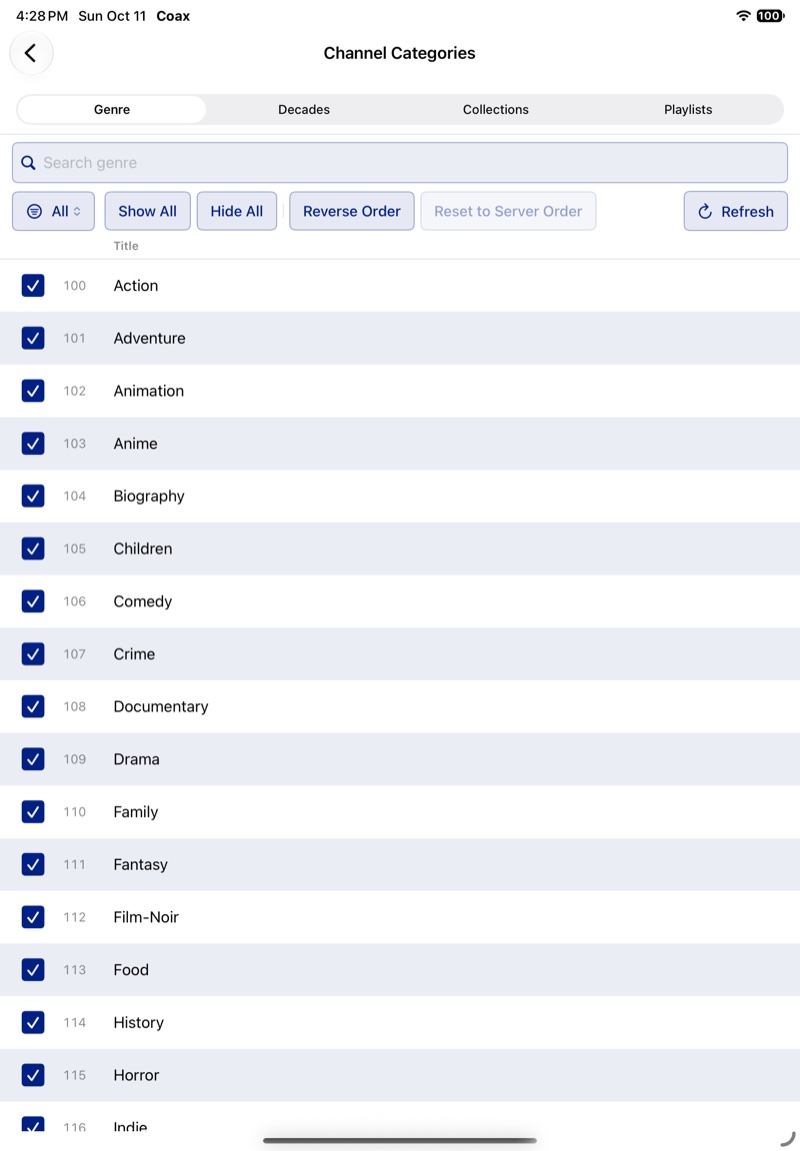
Edit on a row lists its channels: uncheck one to switch it off, or drag them into a new order. Genre, Decades (on Plex), Collections, Playlists, Marathons, Weather, and Live TV have it; the other rows take only a count. Drag the rows themselves to reorder them: see Channel order.
How many channels get made
Channel Amount, under the rows, controls the density:
- Some — one channel for each genre, decade, collection, and playlist, and eight each for directors, studios, and actors.
- A lot — three of each, and sixteen directors, studios, and actors.
- Whoa — five of each, and twenty-eight. Best suited to large libraries.
- Custom — you set each row's count yourself: see Weight a Lineup with Custom.
Collections and playlists
Collections and playlists are how you make a channel of exactly what you want.
A collection lives in one library, and is visible to everyone who can see that library. A playlist is yours and can mix items from several libraries. Use a collection for a canon and a playlist for a mood.
A collection (a box set) is library-wide. A playlist is per user and can mix items from several libraries.
A collection is library-wide. A playlist is per user and can mix items from several libraries.
A channel shuffles its items by default. To air a film series in sequence, choose Edit on the Collections or Playlists row, then switch that collection from Random to Ordered, which keeps the server's order. On Apple TV, set its Preserve order to On. switch that collection from Random to Ordered, which keeps the server's order. switch that collection from Random to Ordered (on iPhone, its shuffle icon), which keeps the server's order. set that collection's Preserve order to On, so it plays in the server's order.
A collection or playlist channel can also take gap content of its own: see Schedule gaps and gap content.
TV show playback (marathon mode)
For lineups with TV show libraries, TV Marathon Mode, under Schedule Settings, chooses how episodes are scheduled:
- Off — fully shuffled. Episodes from all your shows are mixed together, and Coax avoids playing the same show twice in a row.
- Partial — runs of three consecutive episodes of a show, mixed in with runs from your other shows.
- Full — each show's whole run in order, from the first episode to the finale, before the next show starts. Only the order of the shows is shuffled. A real marathon.
TV Marathon Mode is unavailable while Combined Channels is on with a movie library in the lineup — those channels schedule episodes for variety instead. Changing the setting takes effect the next time the lineup's schedule is built. It is separate from the Marathons row in the Channels Manager.
Keeping content out of your guide
You can hide specific content from Coax without removing it from your server. On your server, add any movie, episode, or series to a collection named exactly NoCoax — Coax skips everything in it when building your guide.
Filtering channels by rating
Every lineup has Minimum Age Group and Maximum Age Group settings, in its Content Filters, that cap what can appear in its guide: see Parental Controls, which also covers the household limit.
Combining movie and TV channels
If your lineup includes both movie and TV libraries, Combined Channels merges channels that share a name across those libraries — so one Comedy channel might play a movie, switch to a TV episode, then go back to a film.
With it off, each library's channels stay separate, and Interleave Channel Types alternates movie and TV channels in the numbering (one movie, one TV, and so on) instead of grouping all the movie channels first.
Picking up new genres and collections
New collections, playlists, and genres on your server get their channels the next time you use Refresh on the lineup, unless the Collections or Playlists row is locked under Edit. See How refreshing works.